What’s New: 10Web Speed Optimizer, AI Builder, & Form Maker Widget

The 10Web Automated WordPress Platform stands on five main pillars. One of those pillars is our automated Speed Optimization service which guarantees a 90+ PageSpeed score to websites hosted at 10Web. Another pillar is our AI Builder, which allows you to automate website creation using an AI Assistant to do most of the technical and laborious work of website building. Continuous improvements to the five pillars and our services are an indispensable part of the quality of our platform and the services we offer to you.
10Web Speed Optimizer
The 10Web Speed Optimizer just got more flexible, catering to a wider range of optimization needs!
JS Files Delayed by Default are Now Visible
Now you can see and customize the JS that has been delayed by default. Delete the default JS that you don’t want to delay and add JS that you would like to delay.
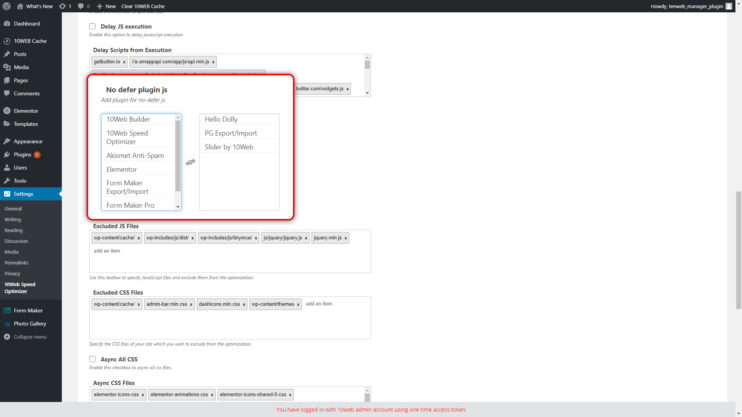
Exclude Plugin JS Files from Defer
This option allows you to exclude from defer the entire JS files of the plugins in the list. Instead of adding them one by one, all you need to do now is click on the plugin to be excluded.
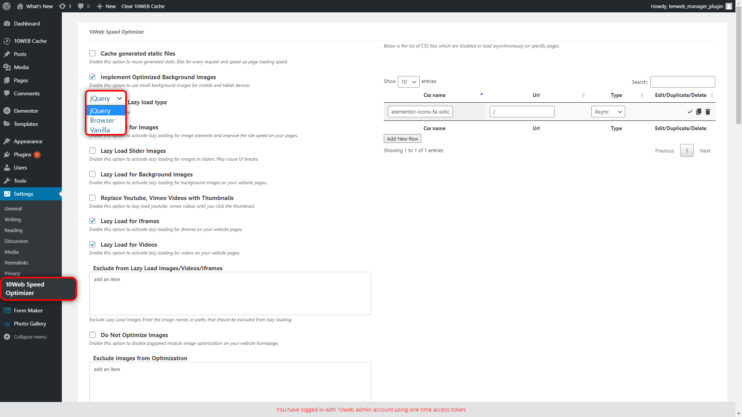
Lazy Load Type
Click on the drop down menu to choose from the three lazyload libraries (jQuery, Vanilla, & Browser/HTML attribute) you would like to use on your website.
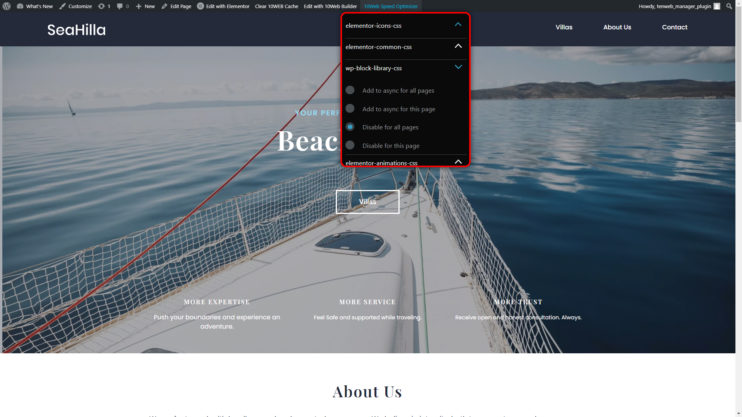
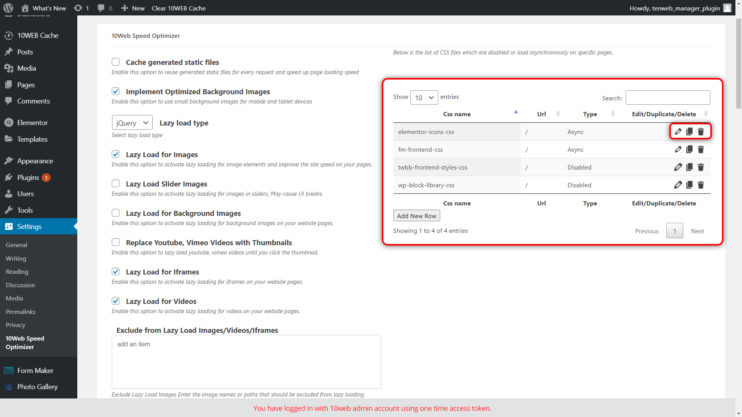
CSS Table Options
When working in the frontend of your site, you can disable or load your CSS files async on that page or the entire site by clicking on the 10Web Speed Optimizer in the top bar. The changes are recorded in the CSS Table in the backend. We have added editing options to the backend table. You can now edit, duplicate, delete, and/or change the name of the given URL.
Jquery.min.js Default Excluded from Optimization
By default the Jquery.min.js file is now excluded from optimization.
Trigger Cache Clear After Plugin/Theme Installation
Cache clear is triggered after a new theme or plugin installation. Now when you install a plugin, your cache will be automatically cleared.
AI Builder
You’ve noticed it, haven’t you. Yes! We’ve made major improvements to the performance of our AI Builder. Everything is faster and more accurate. We have reduced the number of timeout cases by 10 times. Timeouts were especially problematic on the larger pages where most of them occurred.
Precision in classification of non-image elements has been improved and advanced. For these cases, AI has been taught to recognize and recreate the elements as widgets, allowing for far more accurate website recreation.
A new function has been added to the AI Builder. Now the recreation of multi column menus is possible. This adds another layer of flexibility to the types of websites you want to recreate and results in less work for you.
Improvements
- Parallax backgrounds recreation
- Heading Widgets recreation: Correct HTML tag identification resulting in SEO optimization.
- Slider classification and slider styles
- Style improvements
- CTA Widget recreation: Non vertical positioning of button, description, or title in CTA will be split into Button, Text, Heading, and Image widgets to retain the original layout and a more precise recreation of the site.
Bug Fixes
- Fixed: SVG images disappearing on some browsers
10web builder
Form Maker Widget
We have taken one of our awesome plugins, the Form Maker, and made it into a widget. Create forms in WordPress and have quick access to them in the 10Web Builder. Drag and drop the Form Maker Widget into any page, choose from the library of your forms, and customize it as needed.
You like this article? Spread the word!


Will try this tool definitely!
MARIA all I can say is it was worthy to come to your blog a got good information on SEO… I also want to perform an SEO audit for my website
Nice Development tools
Good morning. I need help with WordPress and I’m hoping for one-on-one assistance. I really want to talk with someone who knows wordpress, LIVE. I receive tons of emails from wordpress that offer links to solutions to other peoples’ problems that haven’t done me any good. I’ve tried to unsubscribe from those emails, but I haven’t been able to so now they all go to my spam folder. Again, I’m looking for live support, not some robo link that won’t answer my questions. my blog address is lookingthrualens.com/ricks-hideout/
Hi Richard! Thanks for your comment. For live chat support, please go to https://10web.io/ and click “Ask a question” on the bottom right corner of the page. Alternatively, you can join our WordPress Family Facebook Community and start a discussion with fellow WP users.